Wednesday, September 5, 2012

The Quickest way to edit environment variables in Windows 8

I am trying to setup my Android development environment on my freshly installed Windows 8 machine and quite obviously I needed to add "tools" and "platform-tools" directory from the Android SDK into my %PATH% environment variable. It took me a good couple of minutes to figure out how to do it under Windows 8. So I thought why not save someone else from wasting 2 minutes of his life. Thankfully it really is a 3 step process once you know how to get there:

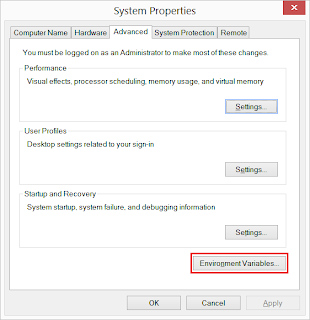
  1. Press the Windows key and just type "control panel" followed by Enter to quickly navigate to Control-Panel.
  2. Now press F3 and type "environment"
  3. That's it, now you should have found a link waiting to be clicked saying "Edit the system environment variables" as shown in the screenshot on the right hand side. Click on that to open the window titled "System Properties" with the "Environment Variables..." button.

UPDATE:
  • Looks likes it's actually a 2 step process :-). You can simply press Windows key, type "Environment" and navigate to "Settings". It will give you the  options to edit both system environment or the user environment variables. Cheers!

Wednesday, August 15, 2012

PDroid (1.32) patch for Android Jelly Bean (AOSP 4.1.1)

Hi Guys, I ported the PDroid ICS patch to apply against AOSP Jelly Bean source. Here is the GitHub repository hosting the patch. I built Jelly Bean with the patch for Motorola Xoom (wingray) and Nexus S (crespo). Everything seems to work! You'll find the build instructions for Ubuntu on GitHub. Cheers!

[1] https://github.com/gsbabil/PDroid-AOSP-JellyBean

PDroid with Android Jelly Bean on Motorola Xoom Tablet (wingray)

Monday, August 6, 2012

AntiTaintDroid (a.k.a. ScrubDroid)- Escaping Taint Analysis (and stealing private information) on Android for Fun and Profit

UPDATE:  source code published on Github [2, 5]
Good news Everyone! I wrote an app that bypasses TaintDroid's [1] privacy monitoring features (Taint analysis) in more than a few ways. I will share the app on my GitHub [2] account very soon. Currently the app is capable of collecting private information such as Android device ID, Google account ID, network ID, IMEI etc. and send it to a pre-configured server (of course without raising any TaintDroid alert). If anyone is interested while I fine-tune my app (add support for reconfigurable server among other small things), please drop me a line in the comments. I would be happy to share how and what I have done.

To know more about how TaintDroid and Taint analysis works, please read their publications here [2]. If you Google for TaintDroid, you will also find a fair amount of information on what it is and how it works. Thanks for reading my Blog. I will update this post as soon as the next bit is ready.


[1] http://appanalysis.org/
[2] https://github.com/gsbabil
[3] http://appanalysis.org/pubs.html
[4] http://www.google.com.au/search?q=TaintDroid
[5] http://gsbabil.github.io/AntiTaintDroid/

Monday, June 18, 2012

Android emulator gives "SDL init failure" error on Ubuntu/Linux

If you are getting the following error:
SDL init failure, reason is: No available video device
from Android emulator on a Unix/Linux platform, this typically indicates your shell's DISPLAY variable is not pointing to the correct X11 Display. Try launching the Android emulator as shown below. You may add your own parameters as needed as long the DISPLAY=:0 is there.
DISPLAY=:0 emulator -kernel your_zImage -system your_system.img -ramdisk your_ramdisk.img -sdcard your_sdcard.img


Wednesday, June 13, 2012

Disable New Tab Page in Firefox 13

Firefox 13 introduced something called "New Tab Page" which shows a history of 9 most visited pages in a tile interface, much like the way Google Chrome does. Actually it looks like the picture below:


But, there are two problems with it. First, if you don't want your browsing history to be shoulder-surfed (someone looking at your browser over your shoulder), this is not a good thing. Second, it actually makes the new tab open a slighter slower than before for which the reason must be obvious.

Anyway, since there's no point-and-click kind of configuration options anywhere in Firefox 13 to turn this feature off, we need to edit Firefox's hidden global configuration settings. This settings interface can be reached by typing "about:config" in the address bar and pressing enter. It will show you a plethora of Firefox's internal options. Most of these options are explained in "Mozilla Knowledge Base". In order to turn off the new tab page, the two relevant options are:
  1. browser.newtab.url
  2. browser.newtabpage.enabled
You can quickly locate these two by typing "newtab" in the search bar. As the name suggests, the first option is set to "about:newtab" as default which is the page that displays the 9 most visited page links in tiled interface. We can set it to "about:blank" to force disable the new tab page feature. The second option is better is setting it to "false" (by right clicking and selecting "Toggle" from the menu) will disable new tab. Next time we click the plus icon in the tab-bar or press Ctrl+T, Firefox will open new tab page without the tiled history links. Cheers!